Strings
Prerequisites: Python Fundamentals
Where this fitsThis builds on Python Fundamentals, where you met the string as one of Python’s data types, and on Operators & Control Flow, whose loops and membership checks you will now apply to text. Strings are the first data type covered in depth, and the ideas here (indexing, slicing, immutability) return in lists and other sequences.
A string is text: a name, a sentence, a whole blog post. Text is everywhere in real software and especially in data science, where a large part of the field, natural language processing, is built entirely on manipulating strings. This note covers what a string is, how to create one, how to reach inside it, and the operations and methods that let you transform it.
What is a string
Logically, a string is a collection of characters. The word Aarav is the characters A, a, r, a, v in order.
More precisely, a Python string is a sequence of Unicode characters. That last word matters.
- Early computers used ASCII, an 8-bit scheme that could represent only 256 characters, enough for English but not for other languages.
- Python uses Unicode, a much larger scheme that can represent characters from every language, along with symbols and emoji.
NoteThis is why a Python string can hold text in any language, or even an emoji, not just English letters. You rarely need to think about it directly, but it explains why Python handles international text so smoothly.
Creating strings
Python gives you a few ways to write a string, and each exists for a reason.
a = 'single quotes'
b = "double quotes"
c = '''triple quotes'''
d = str(5)            # build a string from another value
Single and double quotes both work so you can put one kind of quote inside a string wrapped in the other kind.
print("it's raining")   # single quote inside double quotes, works
print('it's raining')   # error: Python thinks the string ends at it'
Triple quotes are for multi-line strings, text that spans several lines, such as a paragraph a user types into a form.
para = '''This is line one.
This is line two.'''
Accessing characters: indexing
When you create a string, Python automatically assigns each character a position number called an index. Indexing is how you pull out a single character by its position.
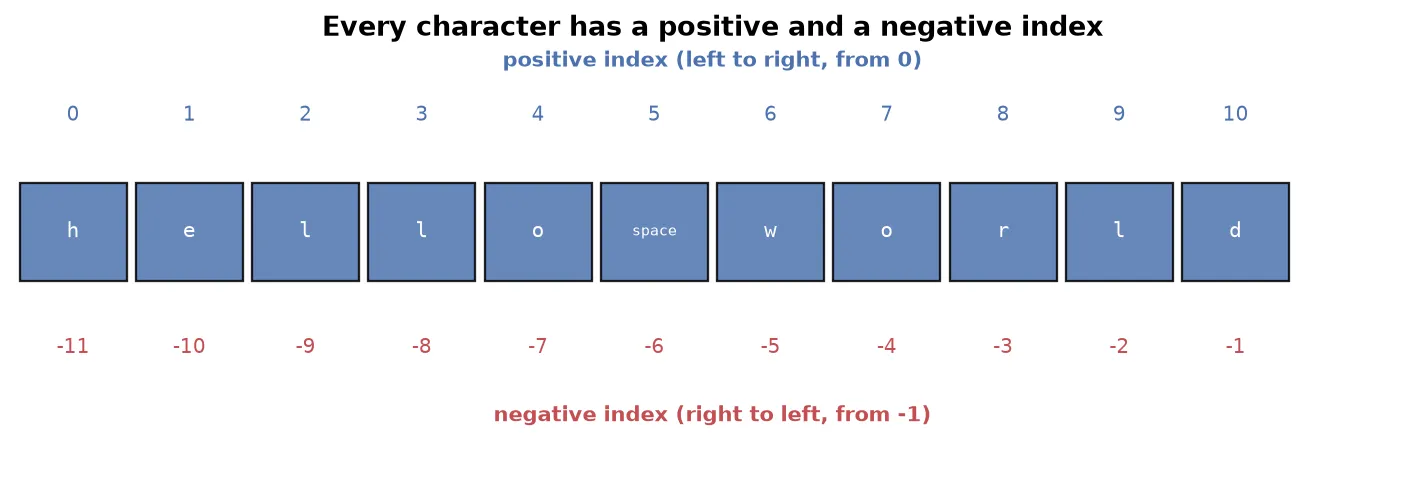
There are two ways to number the characters:
- Positive indexing runs left to right and starts at
0. The first character is0, the second is1, and so on. - Negative indexing runs right to left and starts at
-1. The last character is-1, the second-to-last is-2, and so on.
s = 'hello world'
print(s[0])     # h   (first character)
print(s[-1])    # d   (last character)
print(s[6]) # wTipNegative indexing is what makes “get the last character” easy. Without it, you would first have to find the length of the string. With it,
s[-1]always gives the last character, whatever the length.
Asking for an index that does not exist, like s[41] on an 11-character string, raises an error.
Slicing
Slicing extracts a range of characters at once, rather than a single one. You give a start and a stop index separated by a colon.
![Slicing with s[0:5] takes characters 0 to 4, because the stop index is excluded](/_astro/string_slicing.CVKDtthG_xRiUN.webp)
s = 'hello world'
print(s[0:5])    # hello
The rule that trips up beginners: the start index is included, but the stop index is excluded. s[0:5] gives characters at positions 0, 1, 2, 3, and 4, stopping just before 5.
You can leave out either number, and add a third for the step size, exactly like range.
print(s[:5])       # hello   (start defaults to 0)
print(s[6:])       # world   (stop defaults to the end)
print(s[:])        # hello world   (the whole string)
print(s[0:6:2])    # hlo     (step size 2, take every other character)
A negative step walks backward. The most famous use is reversing a string in one line:
print(s[::-1]) # dlrow ollehWarningWith a negative step, the start index must be larger than the stop index, because you are moving right to left.
s[6:0:-1]works;s[0:6:-1]produces nothing.
Strings are immutable
Try to change a single character in place, and Python refuses.
s = 'hello world'
s[0] = 'H'    # error: 'str' object does not support item assignment
Python strings are immutable, which means once a string is created it cannot be changed. Every operation that looks like it edits a string builds a brand new string and leaves the original untouched.
NoteImmutability is a deep and important property that also governs which data types can be dictionary keys and how memory is shared. For now, remember the practical rule: you cannot edit a string in place.
You can delete a whole string with the del keyword, but you cannot delete part of one, because deleting part would be a change.
s = 'hello world'
del s            # deletes the whole variable, works
del s[0:5]       # error: cannot partially delete an immutable string
Operating on strings
Several operators work on strings.
Concatenation with + joins two strings into one.
print('Delhi' + ' ' + 'Mumbai') # Delhi MumbaiRepetition with * repeats a string a given number of times. This is handy for building separators.
print('Delhi' * 3)   # DelhiDelhiDelhi
print('*' * 20)      # ********************
Comparison operators compare strings lexicographically, meaning dictionary order based on character values. A word that comes later in the dictionary is “greater”.
print('Mumbai' > 'Pune') # False, Mumbai comes first alphabeticallyWarningComparison uses character codes, and capital letters have smaller codes than lowercase ones. So
'Pune' > 'pune'isFalse, because capitalPranks below lowercasep. String comparison is case sensitive.
Membership with in and not in checks whether one string appears inside another, and it is case sensitive.
print('b' in 'Delhi')    # False
print('D' in 'Delhi')    # True
Looping works because a string is iterable: a for loop walks through it one character at a time.
for ch in 'DELHI':
    print(ch)    # D, E, L, H, I on separate lines
String methods
A method is a function attached to a value, called with a dot: s.upper(). Python ships with many string methods; these are the ones you will reach for constantly.
Functions that work on any sequence
These built-in functions work on strings, lists, and other collections alike.
| Function | What it does |
|---|---|
len(s) | counts the characters, including spaces |
max(s) | the character with the highest code |
min(s) | the character with the lowest code |
sorted(s) | returns a sorted list of the characters |
Changing case
| Method | Result on 'hello world' |
|---|---|
s.upper() | 'HELLO WORLD' |
s.lower() | 'hello world' |
s.capitalize() | 'Hello world' (first letter only) |
s.title() | 'Hello World' (first letter of every word) |
s.swapcase() | swaps the case of every letter |
Searching
s.find(sub)returns the index wheresubfirst appears, or-1if it is absent.s.index(sub)does the same but raises an error ifsubis absent.s.count(sub)counts how many timessubappears.s.startswith(sub)ands.endswith(sub)returnTrueorFalse.
s = 'my name is aarav'
print(s.count('a'))        # 4
print(s.find('is'))        # 8
print(s.endswith('av'))    # True
Splitting and joining
split breaks a string into a list of pieces, and join does the reverse. These are among the most used string methods in real work.
sentence = 'hi my name is aarav'
words = sentence.split()          # ['hi', 'my', 'name', 'is', 'aarav']
back = ' '.join(words)            # 'hi my name is aarav'
split breaks on spaces by default, but you can split on any character.
print('a-b-c'.split('-')) # ['a', 'b', 'c']Replacing
replace swaps every occurrence of one substring with another, returning a new string.
print('data cleaning in progress'.replace('progress', 'done'))
# data cleaning in done
Checking content
These return True or False, useful for validating input.
| Method | Checks whether the string is |
|---|---|
s.isalnum() | only letters and digits |
s.isalpha() | only letters |
s.isdigit() | only digits |
s.isidentifier() | a valid variable name |
WarningEvery one of these methods returns a new string (or a value); none of them changes the original. This follows directly from immutability. After
s.upper(),sitself is unchanged unless you reassign it withs = s.upper().
Formatting strings
Often you need to insert a variable’s value into a sentence. The modern, preferred way is an f-string: put an f before the opening quote and write the variable inside curly braces.
name = 'Aarav'
gender = 'male'
print(f'Hi, my name is {name} and I am a {gender}.')
# Hi, my name is Aarav and I am a male.
An older method, .format(), does the same by filling numbered placeholders in order.
print('Hi, my name is {} and I am a {}.'.format(name, gender))TipPrefer f-strings. They put the value right where it appears in the sentence, so the code reads the way the output looks. Reach for
.format()only when you meet it in older code.
Summary
- A string is text, stored as a sequence of Unicode characters, which lets Python hold any language, symbols, and emoji.
- Create strings with single, double, or triple quotes; triple quotes allow multiple lines, and
str()converts other values to text. - Indexing pulls out one character: positive indexing counts from
0on the left, negative indexing counts from-1on the right. - Slicing
s[start:stop:step]pulls out a range, with the stop index excluded;s[::-1]reverses a string. - Strings are immutable: you cannot change a character in place or delete part of one, though you can delete the whole variable.
+concatenates,*repeats, comparison is lexicographic and case sensitive,intests membership, and aforloop iterates character by character.- Useful methods include
len,sorted, the case methods (upper,lower,title), the search methods (find,count,startswith), andsplit,join, andreplace. All return new values and never change the original. - Insert values into text with f-strings, the modern and most readable formatting approach.
Continues toYou can now build and manipulate text. Before moving to more data types, Time Complexity gives you a way to judge whether the code you write, including the loops and slicing here, is efficient.
Test yourself
Quiz me is a timed test of 7 questions drawn from a pool of 14 (~6 mins, score 5+ to complete the note; miss it and it locks until review). Each attempt is a fresh mix. Flashcards is untimed recall practice over the whole pool.
Completion
Score at least 5 of 7 on the quiz above to complete this note.
Private to you, stored in this browser, never uploaded.